记忆系统指南
记忆功能使 Claude 能够跨会话和对话保留上下文。它有两种形式:claude.ai 中的自动合成,以及 Claude Code 中基于文件系统的 CLAUDE.md。
概述
Claude Code 中的记忆提供了跨多个会话和对话持续存在的上下文。与临时的上下文窗口不同,记忆文件允许你:
- 在团队之间共享项目规范
- 存储个人开发偏好
- 维护目录级规则和配置
- 导入外部文档
- 将记忆作为项目的一部分进行版本控制
记忆系统在多个层级运行,从全局个人偏好到特定子目录,允许对 Claude 记住的内容及其应用知识的方式进行精细控制。
记忆命令快速参考
| 命令 | 用途 | 用法 | 使用时机 |
|---|---|---|---|
/init | 初始化项目记忆 | /init | 启动新项目、首次配置 CLAUDE.md |
/memory | 在编辑器中编辑记忆文件 | /memory | 大量更新、重新组织、审查内容 |
# 前缀 | 快速单行记忆添加 | # 你的规则 | 在对话中快速添加规则 |
# new rule into memory | 显式添加记忆 | # new rule into memory<br/>你的详细规则 | 添加复杂的多行规则 |
# remember this | 自然语言记忆 | # remember this<br/>你的指令 | 对话式记忆更新 |
@path/to/file | 导入外部内容 | @README.md 或 @docs/api.md | 在 CLAUDE.md 中引用现有文档 |
快速开始:初始化记忆
/init 命令
/init 命令是在 Claude Code 中设置项目记忆最快捷的方式。它使用基础项目文档初始化一个 CLAUDE.md 文件。
用法:
bash
/init它的作用:
- 在你的项目中创建一个新的 CLAUDE.md 文件(通常在
./CLAUDE.md或./.claude/CLAUDE.md) - 建立项目规范和准则
- 为跨会话的上下文持久化奠定基础
- 提供用于记录项目标准的模板结构
增强交互模式: 设置 CLAUDE_CODE_NEW_INIT=true 以启用多阶段交互流程,逐步引导你完成项目设置:
bash
CLAUDE_CODE_NEW_INIT=true claude
/init
何时使用 /init:
- 使用 Claude Code 启动新项目
- 建立团队编码标准和规范
- 创建关于代码库结构的文档
- 为协作开发设置记忆层级
示例工作流:
markdown
# 在你的项目目录中
/init

# Claude 创建的 CLAUDE.md 结构如下:
# Project Configuration
## Project Overview
- Name: Your Project
- Tech Stack: [Your technologies]
- Team Size: [Number of developers]

## Development Standards
- Code style preferences
- Testing requirements
- Git workflow conventions
使用 # 快速更新记忆
你可以在任何对话中,通过以 # 开头的消息快速将信息添加到记忆中:
语法:
markdown
# 你的记忆规则或指令示例:
markdown
# Always use TypeScript strict mode in this project

# Prefer async/await over promise chains

# Run npm test before every commit

# Use kebab-case for file names
工作原理:
- 以
#加上你的规则开始消息 - Claude 将此识别为记忆更新请求
- Claude 询问更新哪个记忆文件(项目或个人)
- 规则被添加到相应的 CLAUDE.md 文件
- 后续会话自动加载此上下文
替代模式:
markdown
# new rule into memory
Always validate user input with Zod schemas

# remember this
Use semantic versioning for all releases

# add to memory
Database migrations must be reversible
/memory 命令
/memory 命令提供在 Claude Code 会话中直接编辑 CLAUDE.md 记忆文件的入口。它在你的系统编辑器中打开记忆文件以进行全面编辑。
用法:
bash
/memory它的作用:
- 在系统默认编辑器中打开记忆文件
- 允许进行大量的添加、修改和重组
- 提供对层级中所有记忆文件的直接访问
- 让你能够跨会话管理持久化上下文
何时使用 /memory:
- 审查现有记忆内容
- 对项目标准进行大量更新
- 重新组织记忆结构
- 添加详细文档或准则
- 随着项目演进维护和更新记忆
比较:/memory 与 /init
| 方面 | /memory | /init |
|---|---|---|
| 用途 | 编辑现有记忆文件 | 初始化新的 CLAUDE.md |
| 使用时机 | 更新/修改项目上下文 | 开始新项目 |
| 操作 | 打开编辑器进行修改 | 生成起始模板 |
| 工作流 | 持续维护 | 一次性设置 |
示例工作流:
markdown
# 打开记忆进行编辑
/memory

# Claude 提供选项:
# 1. Managed Policy Memory
# 2. Project Memory (./CLAUDE.md)
# 3. User Memory (~/.claude/CLAUDE.md)
# 4. Local Project Memory

# 选择选项 2(项目记忆)
# 默认编辑器打开 ./CLAUDE.md 内容

# 进行修改,保存并关闭编辑器
# Claude 自动重新加载更新后的记忆
使用记忆导入:
CLAUDE.md 文件支持 @path/to/file 语法来包含外部内容:
markdown
# Project Documentation
See @README.md for project overview
See @package.json for available npm commands
See @docs/architecture.md for system design

# Import from home directory using absolute path
@~/.claude/my-project-instructions.md
导入特性:
- 支持相对路径和绝对路径(例如
@docs/api.md或@~/.claude/my-project-instructions.md) - 支持递归导入,最大深度为 5 层
- 首次从外部位置导入时会触发安全审批对话框
- 导入指令在 markdown 代码片段或代码块内不会被解析(因此在示例中记录它们是安全的)
- 通过引用现有文档避免重复
- 自动将引用内容包含在 Claude 的上下文中
记忆架构
Claude Code 中的记忆遵循层级系统,不同的作用域服务于不同的目的:
Claude Code 中的记忆层级
Claude Code 使用多层级的记忆系统。当 Claude Code 启动时,记忆文件会自动加载,较高层级的文件优先级更高。
完整记忆层级(按优先级排序):
托管策略 - 组织范围的指令
- macOS:
/Library/Application Support/ClaudeCode/CLAUDE.md - Linux/WSL:
/etc/claude-code/CLAUDE.md - Windows:
C:\Program Files\ClaudeCode\CLAUDE.md
- macOS:
托管插件 - 按字母顺序合并的策略文件(v2.1.83+)
managed-settings.d/目录位于托管策略 CLAUDE.md 旁边- 文件按字母顺序合并,用于模块化策略管理
项目记忆 - 团队共享上下文(版本控制)
./.claude/CLAUDE.md或./CLAUDE.md(在仓库根目录)
项目规则 - 模块化、主题特定的项目指令
./.claude/rules/*.md
用户记忆 - 个人偏好(所有项目)
~/.claude/CLAUDE.md
用户级规则 - 个人规则(所有项目)
~/.claude/rules/*.md
本地项目记忆 - 个人项目特定偏好
./CLAUDE.local.md
注意:截至 2026 年 3 月,
CLAUDE.local.md未在官方文档中提及。它可能仍作为旧版功能正常运行。对于新项目,请考虑使用~/.claude/CLAUDE.md(用户级)或.claude/rules/(项目级,路径作用域)代替。
- 自动记忆 - Claude 的自动笔记和学习内容
~/.claude/projects/<project>/memory/
记忆发现行为:
Claude 按以下顺序搜索记忆文件,较早的位置优先级更高:
使用 claudeMdExcludes 排除 CLAUDE.md 文件
在大型 monorepo 中,某些 CLAUDE.md 文件可能与你当前的工作无关。claudeMdExcludes 设置允许你跳过特定的 CLAUDE.md 文件,使其不被加载到上下文中:
jsonc
// In ~/.claude/settings.json or .claude/settings.json
{
  "claudeMdExcludes": [
    "packages/legacy-app/CLAUDE.md",
    "vendors/**/CLAUDE.md"
  ]
}
模式相对于项目根目录的路径进行匹配。这对以下情况特别有用:
- 包含许多子项目的 monorepo,其中只有部分与当前工作相关
- 包含第三方或外部 CLAUDE.md 文件的仓库
- 通过排除过时或无关指令来减少 Claude 上下文窗口中的噪音
设置文件层级
Claude Code 的设置(包括 autoMemoryDirectory、claudeMdExcludes 和其他配置)从五层层级中解析,较高层级优先:
| 层级 | 位置 | 作用域 |
|---|---|---|
| 1(最高) | 托管策略(系统级) | 组织范围强制执行 |
| 2 | managed-settings.d/(v2.1.83+) | 模块化策略插件,按字母顺序合并 |
| 3 | ~/.claude/settings.json | 用户偏好 |
| 4 | .claude/settings.json | 项目级(提交到 git) |
| 5(最低) | .claude/settings.local.json | 本地覆盖(被 git 忽略) |
平台特定配置(v2.1.51+):
设置也可以通过以下方式配置:
- macOS:属性列表(plist)文件
- Windows:Windows 注册表
这些平台原生机制与 JSON 设置文件一起读取,并遵循相同的优先级规则。
模块化规则系统
使用 .claude/rules/ 目录结构创建有组织的、路径特定的规则。规则可以在项目级和用户级两个层次定义:
your-project/
├── .claude/
│   ├── CLAUDE.md
│   └── rules/
│       ├── code-style.md
│       ├── testing.md
│       ├── security.md
│       └── api/                  # Subdirectories supported
│           ├── conventions.md
│           └── validation.md

~/.claude/
├── CLAUDE.md
└── rules/                        # User-level rules (all projects)
    ├── personal-style.md
    └── preferred-patterns.md
规则在 rules/ 目录(包括任何子目录)中递归发现。~/.claude/rules/ 下的用户级规则在项目级规则之前加载,允许设置项目可以覆盖的个人默认值。
带 YAML 前置元数据的路径特定规则
定义仅适用于特定文件路径的规则:
markdown
---
paths: src/api/**/*.ts
---

# API Development Rules

- All API endpoints must include input validation
- Use Zod for schema validation
- Document all parameters and response types
- Include error handling for all operations
Glob 模式示例:
**/*.ts- 所有 TypeScript 文件src/**/*- src/ 下的所有文件src/**/*.{ts,tsx}- 多种扩展名{src,lib}/**/*.ts, tests/**/*.test.ts- 多种模式
子目录和符号链接
.claude/rules/ 中的规则支持两种组织功能:
- 子目录:规则被递归发现,因此你可以将它们组织到基于主题的文件夹中(例如
rules/api/、rules/testing/、rules/security/) - 符号链接:支持符号链接,用于在多个项目之间共享规则。例如,你可以将共享规则文件从中央位置符号链接到每个项目的
.claude/rules/目录
记忆位置表
| 位置 | 作用域 | 优先级 | 共享 | 访问方式 | 最适合 |
|---|---|---|---|---|---|
/Library/Application Support/ClaudeCode/CLAUDE.md(macOS) | 托管策略 | 1(最高) | 组织 | 系统 | 公司范围策略 |
/etc/claude-code/CLAUDE.md(Linux/WSL) | 托管策略 | 1(最高) | 组织 | 系统 | 组织标准 |
C:\Program Files\ClaudeCode\CLAUDE.md(Windows) | 托管策略 | 1(最高) | 组织 | 系统 | 企业准则 |
managed-settings.d/*.md(策略旁) | 托管插件 | 1.5 | 组织 | 系统 | 模块化策略文件(v2.1.83+) |
./CLAUDE.md 或 ./.claude/CLAUDE.md | 项目记忆 | 2 | 团队 | Git | 团队标准、共享架构 |
./.claude/rules/*.md | 项目规则 | 3 | 团队 | Git | 路径特定、模块化规则 |
~/.claude/CLAUDE.md | 用户记忆 | 4 | 个人 | 文件系统 | 个人偏好(所有项目) |
~/.claude/rules/*.md | 用户规则 | 5 | 个人 | 文件系统 | 个人规则(所有项目) |
./CLAUDE.local.md | 本地项目 | 6 | 个人 | Git(已忽略) | 个人项目特定偏好 |
~/.claude/projects/<project>/memory/ | 自动记忆 | 7(最低) | 个人 | 文件系统 | Claude 的自动笔记和学习内容 |
记忆更新生命周期
以下是记忆更新在 Claude Code 会话中的流转方式:
自动记忆
自动记忆是 Claude 在与你的项目协作时自动记录学习成果、模式和见解的持久目录。与需要手动编写和维护的 CLAUDE.md 文件不同,自动记忆由 Claude 在会话期间自动写入。
自动记忆的工作原理
- 位置:
~/.claude/projects/<project>/memory/ - 入口文件:
MEMORY.md作为自动记忆目录中的主文件 - 主题文件:针对特定主题的可选附加文件(例如
debugging.md、api-conventions.md) - 加载行为:会话开始时,
MEMORY.md的前 200 行被加载到系统提示中。主题文件按需加载,而非在启动时加载。 - 读写:Claude 在会话期间读写记忆文件,以发现模式和项目特定知识
自动记忆架构
自动记忆目录结构
~/.claude/projects/<project>/memory/
├── MEMORY.md              # Entrypoint (first 200 lines loaded at startup)
├── debugging.md           # Topic file (loaded on demand)
├── api-conventions.md     # Topic file (loaded on demand)
└── testing-patterns.md    # Topic file (loaded on demand)
版本要求
自动记忆需要 Claude Code v2.1.59 或更高版本。如果你使用的是旧版本,请先升级:
bash
npm install -g @anthropic-ai/claude-code@latest自定义自动记忆目录
默认情况下,自动记忆存储在 ~/.claude/projects/<project>/memory/。你可以使用 autoMemoryDirectory 设置更改此位置(自 v2.1.74 起可用):
jsonc
// In ~/.claude/settings.json or .claude/settings.local.json (user/local settings only)
{
  "autoMemoryDirectory": "/path/to/custom/memory/directory"
}注意:
autoMemoryDirectory只能在用户级(~/.claude/settings.json)或本地设置(.claude/settings.local.json)中配置,不能在项目或托管策略设置中配置。
这在以下情况下非常有用:
- 将自动记忆存储在共享或同步的位置
- 将自动记忆与默认 Claude 配置目录分离
- 在默认层级之外使用项目特定路径
工作树和仓库共享
同一 git 仓库中的所有工作树和子目录共享一个自动记忆目录。这意味着在工作树之间切换或在同一仓库的不同子目录中工作时,都会读写相同的记忆文件。
子代理记忆
子代理(通过 Task 或并行执行等工具生成)可以拥有自己的记忆上下文。使用子代理定义中的 memory 前置元数据字段来指定要加载的记忆作用域:
yaml
memory: user      # Load user-level memory only
memory: project   # Load project-level memory only
memory: local     # Load local memory only
这允许子代理以专注的上下文运行,而不是继承完整的记忆层级。
控制自动记忆
可以通过 CLAUDE_CODE_DISABLE_AUTO_MEMORY 环境变量控制自动记忆:
| 值 | 行为 |
|---|---|
0 | 强制开启自动记忆 |
1 | 强制关闭自动记忆 |
| (未设置) | 默认行为(自动记忆已启用) |
bash
# Disable auto memory for a session
CLAUDE_CODE_DISABLE_AUTO_MEMORY=1 claude

# Force auto memory on explicitly
CLAUDE_CODE_DISABLE_AUTO_MEMORY=0 claude
使用 --add-dir 添加额外目录
--add-dir 标志允许 Claude Code 从当前工作目录之外的额外目录加载 CLAUDE.md 文件。这对于其他目录的上下文也相关的 monorepo 或多项目设置非常有用。
要启用此功能,请设置环境变量:
bash
CLAUDE_CODE_ADDITIONAL_DIRECTORIES_CLAUDE_MD=1然后使用该标志启动 Claude Code:
bash
claude --add-dir /path/to/other/projectClaude 将从指定的额外目录加载 CLAUDE.md,同时加载来自当前工作目录的记忆文件。
实用示例
示例 1:项目记忆结构
文件: ./CLAUDE.md
markdown
# Project Configuration

## Project Overview
- **Name**: E-commerce Platform
- **Tech Stack**: Node.js, PostgreSQL, React 18, Docker
- **Team Size**: 5 developers
- **Deadline**: Q4 2025

## Architecture
@docs/architecture.md
@docs/api-standards.md
@docs/database-schema.md

## Development Standards

### Code Style
- Use Prettier for formatting
- Use ESLint with airbnb config
- Maximum line length: 100 characters
- Use 2-space indentation

### Naming Conventions
- **Files**: kebab-case (user-controller.js)
- **Classes**: PascalCase (UserService)
- **Functions/Variables**: camelCase (getUserById)
- **Constants**: UPPER_SNAKE_CASE (API_BASE_URL)
- **Database Tables**: snake_case (user_accounts)

### Git Workflow
- Branch names: `feature/description` or `fix/description`
- Commit messages: Follow conventional commits
- PR required before merge
- All CI/CD checks must pass
- Minimum 1 approval required

### Testing Requirements
- Minimum 80% code coverage
- All critical paths must have tests
- Use Jest for unit tests
- Use Cypress for E2E tests
- Test filenames: `*.test.ts` or `*.spec.ts`

### API Standards
- RESTful endpoints only
- JSON request/response
- Use HTTP status codes correctly
- Version API endpoints: `/api/v1/`
- Document all endpoints with examples

### Database
- Use migrations for schema changes
- Never hardcode credentials
- Use connection pooling
- Enable query logging in development
- Regular backups required

### Deployment
- Docker-based deployment
- Kubernetes orchestration
- Blue-green deployment strategy
- Automatic rollback on failure
- Database migrations run before deploy

## Common Commands

| Command | Purpose |
|---------|---------|
| `npm run dev` | Start development server |
| `npm test` | Run test suite |
| `npm run lint` | Check code style |
| `npm run build` | Build for production |
| `npm run migrate` | Run database migrations |

## Team Contacts
- Tech Lead: Sarah Chen (@sarah.chen)
- Product Manager: Mike Johnson (@mike.j)
- DevOps: Alex Kim (@alex.k)

## Known Issues & Workarounds
- PostgreSQL connection pooling limited to 20 during peak hours
- Workaround: Implement query queuing
- Safari 14 compatibility issues with async generators
- Workaround: Use Babel transpiler

## Related Projects
- Analytics Dashboard: `/projects/analytics`
- Mobile App: `/projects/mobile`
- Admin Panel: `/projects/admin`
示例 2:目录级记忆
文件: ./src/api/CLAUDE.md
markdown
# API Module Standards

This file overrides root CLAUDE.md for everything in /src/api/

## API-Specific Standards

### Request Validation
- Use Zod for schema validation
- Always validate input
- Return 400 with validation errors
- Include field-level error details

### Authentication
- All endpoints require JWT token
- Token in Authorization header
- Token expires after 24 hours
- Implement refresh token mechanism

### Response Format

All responses must follow this structure:

```json
{
  "success": true,
  "data": { /* actual data */ },
  "timestamp": "2025-11-06T10:30:00Z",
  "version": "1.0"
}
Error responses:
json
{
  "success": false,
  "error": {
    "code": "VALIDATION_ERROR",
    "message": "User message",
    "details": { /* field errors */ }
  },
  "timestamp": "2025-11-06T10:30:00Z"
}
Pagination
- Use cursor-based pagination (not offset)
- Include
hasMoreboolean - Limit max page size to 100
- Default page size: 20
Rate Limiting
- 1000 requests per hour for authenticated users
- 100 requests per hour for public endpoints
- Return 429 when exceeded
- Include retry-after header
Caching
- Use Redis for session caching
- Cache duration: 5 minutes default
- Invalidate on write operations
- Tag cache keys with resource type
### 示例 3:个人记忆

**文件:** `~/.claude/CLAUDE.md`

```markdown
# My Development Preferences

## About Me
- **Experience Level**: 8 years full-stack development
- **Preferred Languages**: TypeScript, Python
- **Communication Style**: Direct, with examples
- **Learning Style**: Visual diagrams with code

## Code Preferences

### Error Handling
I prefer explicit error handling with try-catch blocks and meaningful error messages.
Avoid generic errors. Always log errors for debugging.

### Comments
Use comments for WHY, not WHAT. Code should be self-documenting.
Comments should explain business logic or non-obvious decisions.

### Testing
I prefer TDD (test-driven development).
Write tests first, then implementation.
Focus on behavior, not implementation details.

### Architecture
I prefer modular, loosely-coupled design.
Use dependency injection for testability.
Separate concerns (Controllers, Services, Repositories).

## Debugging Preferences
- Use console.log with prefix: `[DEBUG]`
- Include context: function name, relevant variables
- Use stack traces when available
- Always include timestamps in logs

## Communication
- Explain complex concepts with diagrams
- Show concrete examples before explaining theory
- Include before/after code snippets
- Summarize key points at the end

## Project Organization
I organize my projects as:

   project/
   ├── src/
   │   ├── api/
   │   ├── services/
   │   ├── models/
   │   └── utils/
   ├── tests/
   ├── docs/
   └── docker/

## Tooling
- **IDE**: VS Code with vim keybindings
- **Terminal**: Zsh with Oh-My-Zsh
- **Format**: Prettier (100 char line length)
- **Linter**: ESLint with airbnb config
- **Test Framework**: Jest with React Testing Library
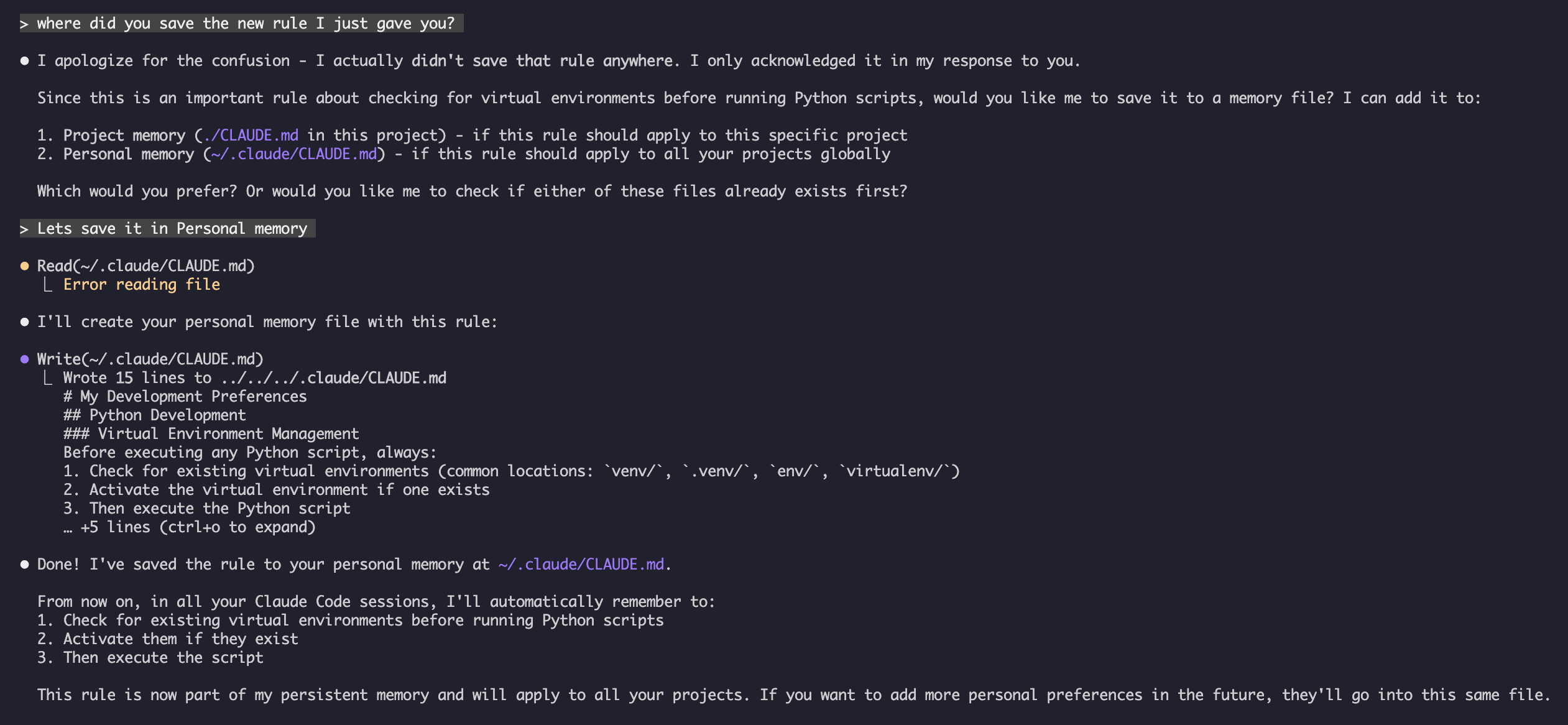
我的测试 让 Claude 保存新规则
 Claude 没有保存规则,因为我在任何地方都没有
 Claude.md 文件。然后让 Claude 确认位置。
示例 4:会话期间更新记忆
你可以在活跃的 Claude Code 会话期间向记忆添加新规则。有两种方式可以做到这一点:
方式 1:直接请求
markdown
User: Remember that I prefer using React hooks instead of class components
     for all new components.

Claude: I'm adding that to your memory. Which memory file should this go in?
        1. Project memory (./CLAUDE.md)
        2. Personal memory (~/.claude/CLAUDE.md)

User: Project memory

Claude: ✅ Memory saved!

Added to ./CLAUDE.md:
---

### Component Development
- Use functional components with React Hooks
- Prefer hooks over class components
- Custom hooks for reusable logic
- Use useCallback for event handlers
- Use useMemo for expensive computations
方式 2:使用 "# new rule into memory" 模式
你也可以使用显式模式 "# new rule into memory" 来触发记忆更新:
markdown
User: # new rule into memory
      Always validate user input with Zod schemas before processing.

Claude: I'm saving this rule to memory. Which memory file should I use?
        1. Project memory (./CLAUDE.md)
        2. Personal memory (~/.claude/CLAUDE.md)

User: Project memory

Claude: ✅ Memory saved!

Added to ./CLAUDE.md:
---

### Input Validation
- Always validate user input with Zod schemas before processing
- Define schemas at the top of each API handler file
- Return 400 status with validation errors
添加记忆的技巧
- 制定具体且可操作的规则
- 在章节标题下将相关规则分组
- 更新现有章节而不是重复内容
- 选择合适的记忆作用域(项目级还是个人级)
记忆功能对比
| 功能 | Claude Web/桌面版 | Claude Code(CLAUDE.md) |
|---|---|---|
| 自动合成 | ✅ 每 24 小时 | ❌ 手动 |
| 跨项目 | ✅ 共享 | ❌ 项目特定 |
| 团队访问 | ✅ 共享项目 | ✅ Git 跟踪 |
| 可搜索 | ✅ 内置 | ✅ 通过 /memory |
| 可编辑 | ✅ 对话中 | ✅ 直接文件编辑 |
| 导入/导出 | ✅ 是 | ✅ 复制/粘贴 |
| 持久性 | ✅ 24 小时以上 | ✅ 无限期 |
Claude Web/桌面版中的记忆
记忆合成时间线
记忆摘要示例:
markdown
## Claude's Memory of User

### Professional Background
- Senior full-stack developer with 8 years experience
- Focus on TypeScript/Node.js backends and React frontends
- Active open source contributor
- Interested in AI and machine learning

### Project Context
- Currently building e-commerce platform
- Tech stack: Node.js, PostgreSQL, React 18, Docker
- Working with team of 5 developers
- Using CI/CD and blue-green deployments

### Communication Preferences
- Prefers direct, concise explanations
- Likes visual diagrams and examples
- Appreciates code snippets
- Explains business logic in comments

### Current Goals
- Improve API performance
- Increase test coverage to 90%
- Implement caching strategy
- Document architecture
最佳实践
应该做的 - 包含什么内容
具体详细:使用清晰、详细的指令,而非模糊的指导
- ✅ 好的:「所有 JavaScript 文件使用 2 个空格缩进」
- ❌ 避免:「遵循最佳实践」
保持有序:使用清晰的 markdown 章节和标题组织记忆文件
使用适当的层级:
- 托管策略:公司范围策略、安全标准、合规要求
- 项目记忆:团队标准、架构、编码规范(提交到 git)
- 用户记忆:个人偏好、沟通风格、工具选择
- 目录记忆:模块特定规则和覆盖
利用导入:使用
@path/to/file语法引用现有文档- 支持最多 5 层递归嵌套
- 避免记忆文件之间的重复
- 示例:
See @README.md for project overview
记录常用命令:包含你反复使用的命令以节省时间
对项目记忆进行版本控制:将项目级 CLAUDE.md 文件提交到 git,以便团队共同受益
定期审查:随着项目演进和需求变化,定期更新记忆
提供具体示例:包含代码片段和具体场景
不应该做的 - 避免什么内容
不要存储密钥:切勿包含 API 密钥、密码、令牌或凭据
不要包含敏感数据:不包含 PII、私人信息或专有秘密
不要重复内容:使用导入(
@path)引用现有文档,而不是复制内容不要模糊:避免「遵循最佳实践」或「写好代码」等泛泛之词
不要太长:保持单个记忆文件专注,不超过 500 行
不要过度组织:策略性地使用层级;不要创建过多的子目录覆盖
不要忘记更新:过时的记忆可能导致混乱和过时的实践
不要超过嵌套限制:记忆导入支持最多 5 层嵌套
记忆管理技巧
选择合适的记忆层级:
| 使用场景 | 记忆层级 | 理由 |
|---|---|---|
| 公司安全策略 | 托管策略 | 适用于整个组织的所有项目 |
| 团队代码风格指南 | 项目 | 通过 git 与团队共享 |
| 你偏好的编辑器快捷键 | 用户 | 个人偏好,不共享 |
| API 模块标准 | 目录 | 仅针对该模块 |
快速更新工作流:
- 单条规则:在对话中使用
#前缀 - 多处修改:使用
/memory打开编辑器 - 初始设置:使用
/init创建模板
导入最佳实践:
markdown
# Good: Reference existing docs
@README.md
@docs/architecture.md
@package.json

# Avoid: Copying content that exists elsewhere
# Instead of copying README content into CLAUDE.md, just import it
安装说明
设置项目记忆
方式 1:使用 /init 命令(推荐)
设置项目记忆最快捷的方式:
导航到你的项目目录:
bashcd /path/to/your/project在 Claude Code 中运行 init 命令:
bash/initClaude 将创建并填充 CLAUDE.md 模板结构
自定义生成的文件 以满足你的项目需求
提交到 git:
bashgit add CLAUDE.md git commit -m "Initialize project memory with /init"
方式 2:手动创建
如果你更喜欢手动设置:
在项目根目录创建 CLAUDE.md:
bashcd /path/to/your/project touch CLAUDE.md添加项目标准:
bashcat > CLAUDE.md << 'EOF' # Project Configuration ## Project Overview - **Name**: Your Project Name - **Tech Stack**: List your technologies - **Team Size**: Number of developers ## Development Standards - Your coding standards - Naming conventions - Testing requirements EOF提交到 git:
bashgit add CLAUDE.md git commit -m "Add project memory configuration"
方式 3:使用 # 快速更新
CLAUDE.md 存在后,在对话中快速添加规则:
markdown
# Use semantic versioning for all releases

# Always run tests before committing

# Prefer composition over inheritance
Claude 会提示你选择更新哪个记忆文件。
设置个人记忆
创建 ~/.claude 目录:
bashmkdir -p ~/.claude创建个人 CLAUDE.md:
bashtouch ~/.claude/CLAUDE.md添加你的偏好:
bashcat > ~/.claude/CLAUDE.md << 'EOF' # My Development Preferences ## About Me - Experience Level: [Your level] - Preferred Languages: [Your languages] - Communication Style: [Your style] ## Code Preferences - [Your preferences] EOF
设置目录级记忆
为特定目录创建记忆:
bashmkdir -p /path/to/directory/.claude touch /path/to/directory/CLAUDE.md添加目录特定规则:
bashcat > /path/to/directory/CLAUDE.md << 'EOF' # [Directory Name] Standards This file overrides root CLAUDE.md for this directory. ## [Specific Standards] EOF提交到版本控制:
bashgit add /path/to/directory/CLAUDE.md git commit -m "Add [directory] memory configuration"
验证设置
检查记忆位置:
bash# Project root memory ls -la ./CLAUDE.md # Personal memory ls -la ~/.claude/CLAUDE.mdClaude Code 启动会话时将自动加载这些文件
在你的项目中启动新会话,通过 Claude Code 进行测试
官方文档
获取最新信息,请参阅官方 Claude Code 文档:
官方文档中的关键技术细节
记忆加载:
- Claude Code 启动时自动加载所有记忆文件
- Claude 从当前工作目录向上遍历以发现 CLAUDE.md 文件
- 访问子目录时,子树文件被按需发现和加载
导入语法:
- 使用
@path/to/file包含外部内容(例如@~/.claude/my-project-instructions.md) - 支持相对路径和绝对路径
- 支持递归导入,最大深度为 5 层
- 首次外部导入触发审批对话框
- 在 markdown 代码片段或代码块内不会被解析
- 自动将引用内容包含在 Claude 的上下文中
记忆层级优先级:
- 托管策略(最高优先级)
- 托管插件(
managed-settings.d/,v2.1.83+) - 项目记忆
- 项目规则(
.claude/rules/) - 用户记忆
- 用户级规则(
~/.claude/rules/) - 本地项目记忆
- 自动记忆(最低优先级)
相关概念链接
集成点
相关 Claude 功能
- Claude Web 记忆 - 自动合成
- 官方记忆文档 - Anthropic 文档